Day-end review
Day-end review. Connect activity with the records behind it.
Visits are over, but collections, remaining stock and handovers still need to be reviewed.
Review the working day using the orders, sales, payments and stock activity your team recorded. Keep the evidence close when a total or exception needs explanation.

Who this is for.
Owners and supervisors reviewing field work, accounts teams checking collections, and operations staff following up on incomplete handovers.
How the work connects.
Field team · GroundLink
Complete the closing steps.
Follow the day-end workflow your company has configured and review the work recorded during the day.
Operations · ControlRoom
Review the handover.
Check collections, pending records and any remaining stock. Confirm the appropriate return location for your operation.
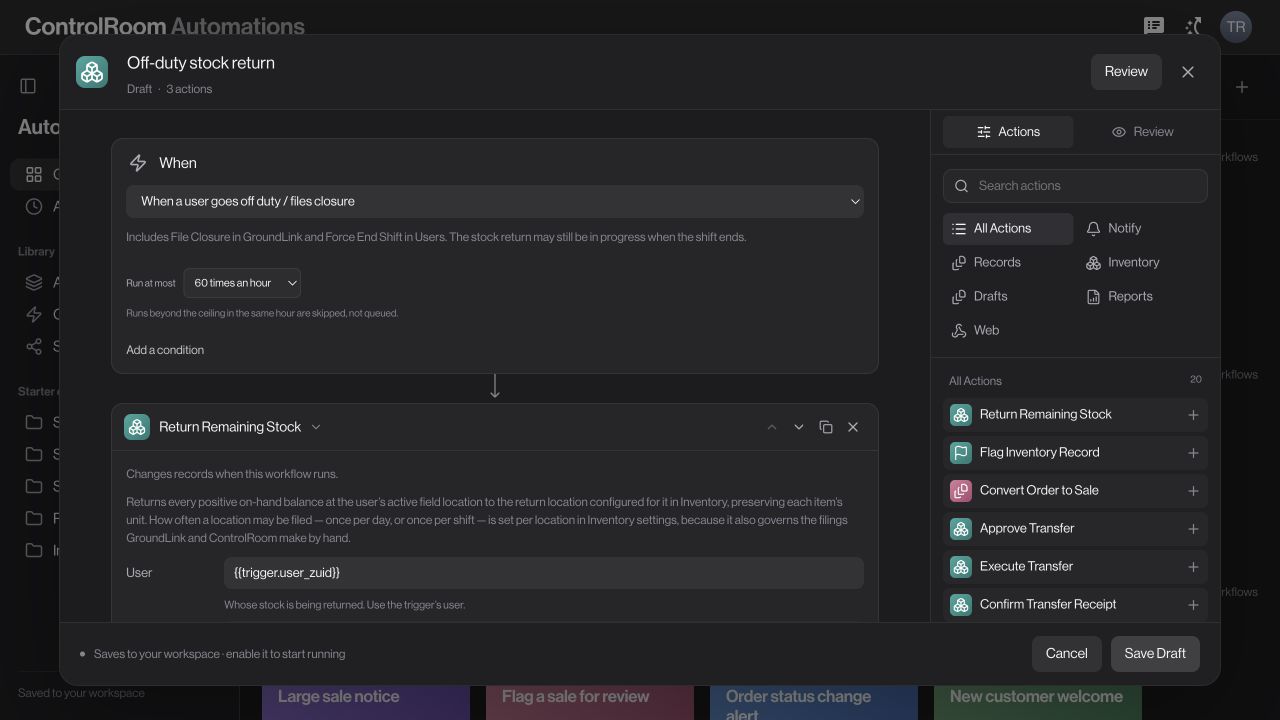
Process owner · Automations
Define the repeatable parts.
Where supported, configure the trigger, conditions, stock-return actions and report recipients. Review and enable the flow only after its rules are correct.
A defined closing process makes it clear what should be checked, returned and reported.
What to agree before you start.
- Agree the date, people and locations included in each review.
- Define which source records must be checked before treating a day as reconciled.
- Set up any closure automation deliberately, including conditions, stock destination and named report recipient.
Check the outcome.
Open the source records behind a total and compare them with your expected activity. Review exceptions separately. A report or an off-duty event does not certify that every collection has settled or every stock handover is complete.
Available controls depend on your plan, permissions and company configuration. Review your actual workflow in a demo before deciding whether it fits.
Try the workflow, step by step.
Directive Journal explains the controls, what to prepare and how to check your result.
Questions before you choose.
What should a day-end review include?
Start with the people, date and locations being reviewed. Compare orders, sales, recorded collections and stock movements, then investigate missing references or incomplete handovers. A total is a starting point for checking the underlying records.
How do reviewed records reach my accounting tools?
AutoSync provides one-click forward sync from Closure to a configured BUSY or TallyPrime workflow for supported organisation data. Confirm the connector setup and supported records first. This is forward sync, not a two-way accounting integration.
Choose the right starting point.
ControlRoom gives the office a shared view of records. GroundLink helps field teams record work where it happens. Compare the plan capabilities and bring one real example of your process to a demo.