Field sales
Field sales orders. Clear from customer to office.
A representative takes an order. The office needs the exact items and quantities, without piecing together calls and messages.
Use GroundLink to record the customer’s request and ControlRoom to review it. Keep the items, quantities, customer and status together instead of rebuilding the order from messages.

Who this is for.
Owners, sales managers and representatives who take orders away from the office, including teams coordinating customer visits and product supply.
How the work connects.
In the field · GroundLink
Record the request.
Find the customer, choose the products and quantities, and review the order before submitting it.
At the desk · ControlRoom
Review the details.
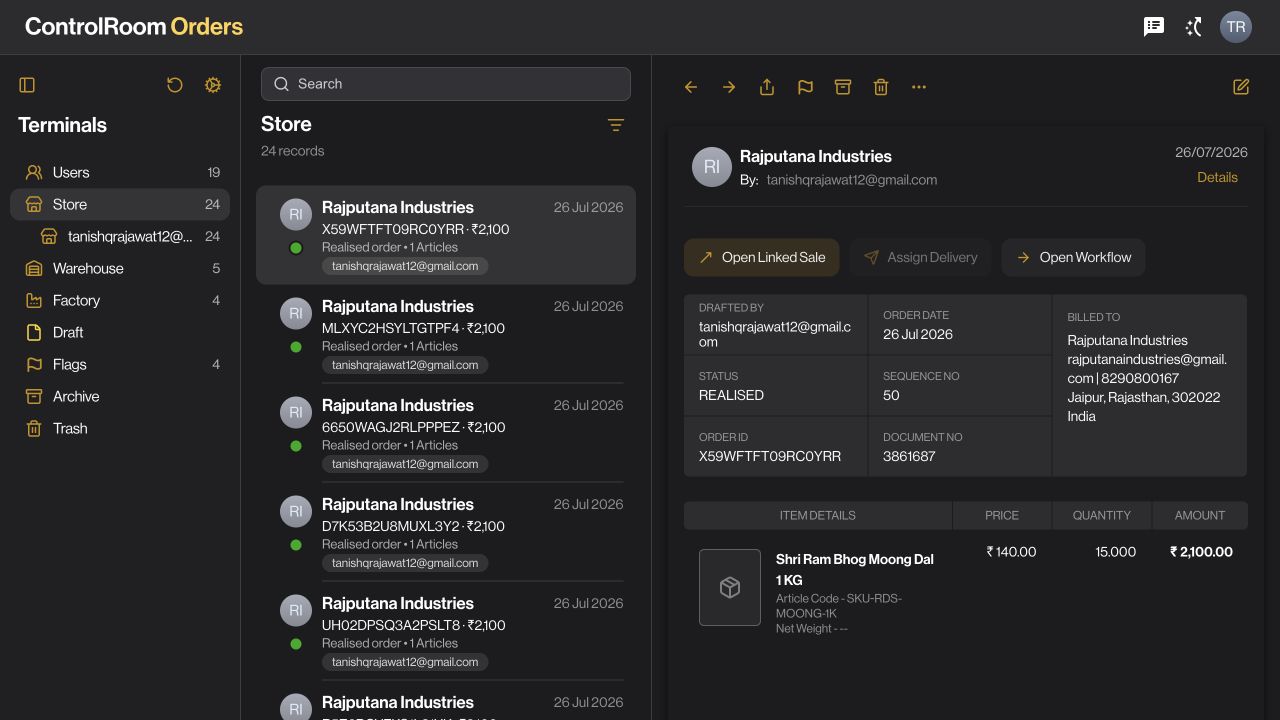
Open Orders, find the record, and review the customer, items, amount and status together.
With the team
Coordinate what follows.
Check available stock and organise the fulfilment steps your business uses. Return to the same record when the customer asks for an update.
A recorded order gives both teams a clear reference for the next conversation.
What to agree before you start.
- Keep your customer and product records current, including the units your team sells in.
- Decide who can take orders, who reviews them and which locations each person can access.
- Agree when an order should be converted to a sale, and who checks availability and fulfilment.
Check the outcome.
After the representative submits an order, locate that same order in ControlRoom. Compare customer, quantities, amount and status. An order records the request; it does not by itself prove that goods were delivered or payment was collected.
Available controls depend on your plan, permissions and company configuration. Review your actual workflow in a demo before deciding whether it fits.
Try the workflow, step by step.
Directive Journal explains the controls, what to prepare and how to check your result.
Questions before you choose.
Can my sales team replace order messages with an app?
GroundLink lets representatives record an order against a customer. The office can review that record in ControlRoom instead of reconstructing quantities from a chat. Start with current customer and product records, then agree who reviews and fulfils each order.
Does placing an order also create a sale or collect payment?
An order captures what the customer requested. Review fulfilment and conversion separately, and record any collection through the payment workflow. Keeping these steps distinct helps the office spot unfinished work.
Choose the right starting point.
ControlRoom gives the office a shared view of records. GroundLink helps field teams record work where it happens. Compare the plan capabilities and bring one real example of your process to a demo.